
Useful Salesforce Admin tools
- 21
- December
- 2012
Here are a few useful Salesforce Admin tools that every salesforce administrator would like to have.
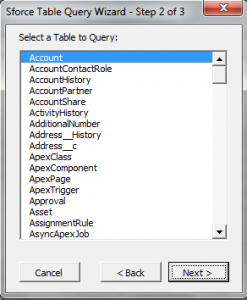
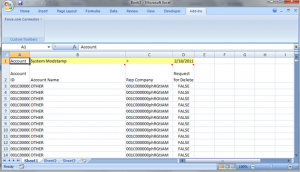
Excel Connector: Used for manipulating data in salesforce.com from excel
This one is a really powerful tool especially if you love excel. You can extract data from salesforce directly into excel as well as make update from excel into Salesforce. There is an enterprise edition as well as a Professional edition. Based on your licensing download the appropriate edition. You do need office toolkit installed before using the Excel Connector
Excel Connector Installation: http://code.google.com/p/excel-connector/
Office Toolkit: Under Setup->Connect for Office after logging into salesforce or from http://code.google.com/p/excel-connector/downloads/detail?name=SForce_Office_Toolkit_MSI.zip&can=2&q=
Training Video on Using Excel Connector: https://salesforce.adobeconnect.com/_a13852757/p97003840
Salesforce.com DataLoader
This is window based application used for updating/manipulating data in salesforce.com. Can be used to update large amounts of data. Dataloader also has a interface that can be automate programmatically to schedule data load jobs. This can be downloaded from your salesforce environment. To download Apex Dataloader, login to your salesforce environment go toData Management click on data loader from where you can download Apex Dataloader.
For steps how to download apex dataloader and insert records see this video :
Insert Records into to salesforce using Apex data loader
Force.com Explorer
This is a great tool test development of apex/SOQL queries as well as viewing the schema
You can install from http://wiki.developerforce.com/page/Apex_Explorer
Workbench
This is a great tool test development of apex/SOQL queries as well as viewing the schema which is browser based.
https://workbench.developerforce.com/
RoboForm
Are you are an administrator/developer who has access to multiple salesforce instances or access various websites which require you to login. The security policies of these website require you to frequently change the passwords. If you are wondering how would one remember the passwords for all these sites. The answer is a neat tool called RoboForm.
You can download and install RoboForm from www.roboform.com. Roboform creates a toolbar on the browser and asks everytime you enter the username and password if you want to save the username/password combination. Once you have it saved, next time you visit the site you can fill in the username and password just by a click of mouse button. Everytime you change the pwd it asks if it needs to update the password in roboform.
You can also create automatically generated strong passwords thereby having different strong passwords for different sites minimizing the risk of passwords getting into the hands of unwanted people. You would only require to remember only one password that of Roboform and roboform remembers the rest for you.
Chrome Plugins
Force.com LOGINS
This is very good utility to store your usernames,passwords and security tokens if you have many logins. Best of all its free. you can install this plugin from here





Recent Posts
- Account Based Marketing – How Is It Different, and What Are The Best Tactics?
- Add new licenses or cancel subscription for Leadpal appexchange product
- Salesforce to Quickbooks integration options
- Online Salesforce Apex and Visualforce Development Trainings
- Merge and Auto Convert of leads into existing Accounts based on Rules : LeadPal
Archives
- September 2015
- July 2015
- May 2015
- April 2015
- March 2015
- February 2015
- November 2014
- October 2014
- July 2014
- June 2014
- April 2014
- March 2014
- January 2014
- December 2013
- November 2013
- October 2013
- September 2013
- August 2013
- July 2013
- December 2012


