
Moving from Salesforce Portals to Communities
- 08
- January
- 2014
In September, I talked about what Salesforce Communities is about in the blog, and hopefully I have inspired you to look into how it can be applicable to your business. Today I would like to show you how to start your Salesforce Communities in a few steps.I know you are excited to learn all the details on moving Salesforce Portals to Communities. But since there is no turning back once Communities is enabled, let’s take a step back, pause, and do a reality check. The first question to ask yourself and your team is:
Am I ready for moving from Salesforce portals to Communities?
At this point, I hope you are convinced that Communities can provide a powerful tool to advance your business and improve the relationships with customers and partners. However, a tool can be only as powerful as the amount of effort a user putting in. Salesforce Communities connect customers/partners interaction with the internal business processes. To maintain a healthy Communities, you need to continuous supply timely, relevant information to your customers and partners, and to ensure appropriate actions are taken. This means you will need your marketing department to provide contents, active moderators to monitor all activities, and support teams to respond to various situations. Therefore, before you start, make sure you have everything lined up and planned out.
Step 1: Make sure you have licenses for salesforce communities.
This can be checked from Setup->Company Profile->Company Information
Step 2: Set up your community.
Please use the following guide
http://help.salesforce.com/help/pdfs/en/salesforce_communities_implementation.pdf
Step 3: Branding your communities
There are different ways of branding communities
- Using basic color coding
- Delivering targeted content
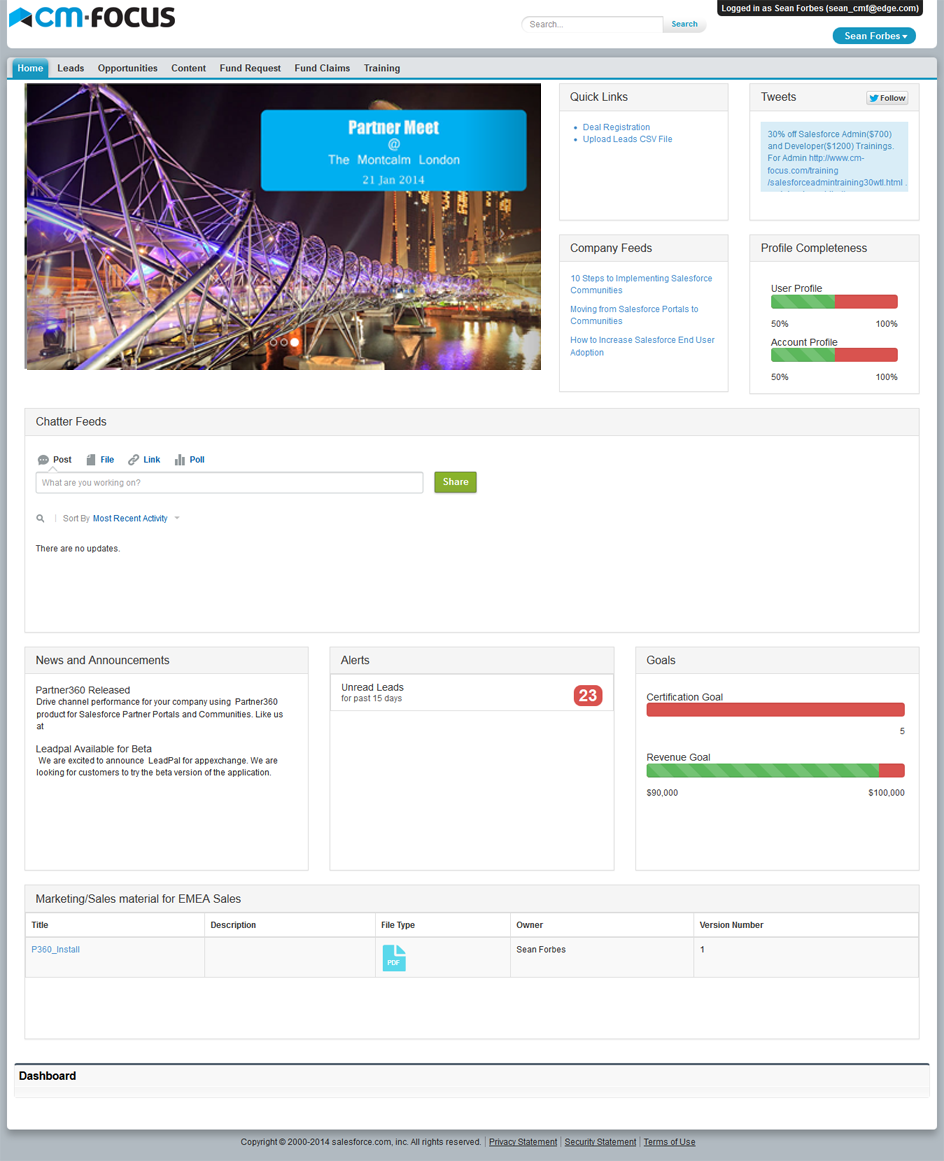
This can be done using our appexchange app . Using the app you can deliver targeted content based on the current logged in user. For example the users from EMEA will see targeted content for EMEA and users from North America will see targeted content for North America. You can view more details below.
Below is a screen shot for targeted content being delivered using partner360 app
You can develop branding/content using site.com technology from salesforce. Below is an example of how site.com is used to set up a community
https://partner360-developer-edition.na15.force.com/cmfocus/s/
If you want to move from salesforce portals to communities and would need some help contact us at info[at]cm-focus.com


Recent Posts
- Account Based Marketing – How Is It Different, and What Are The Best Tactics?
- Add new licenses or cancel subscription for Leadpal appexchange product
- Salesforce to Quickbooks integration options
- Online Salesforce Apex and Visualforce Development Trainings
- Merge and Auto Convert of leads into existing Accounts based on Rules : LeadPal
Archives
- September 2015
- July 2015
- May 2015
- April 2015
- March 2015
- February 2015
- November 2014
- October 2014
- July 2014
- June 2014
- April 2014
- March 2014
- January 2014
- December 2013
- November 2013
- October 2013
- September 2013
- August 2013
- July 2013
- December 2012


