
Leadpal Release notes
- 18
- February
- 2015
Leadpal version 2.44 release notes
- Added new formula field in Accounts to capture the website domain name
- Enhanced the Bulk Convert to include option of changing the Accounts in all rows of Leads in one go.
- Added new tab on Leads to show leadpal intelligence
- Links for search for company related news in Google News
- Links for search for company in LinkedIn
- Links for search for lead name and company in Google
- Links for search for lead name and company in LnkedIn
- Links for search for lead name and company in Bing
- Added new tab on leads to show related Accounts and Contacts
- Display existing related Accounts
- Display existing related Contacts
Instructions to how to add the Lead Intelligence and Related Accounts and Related Contacts
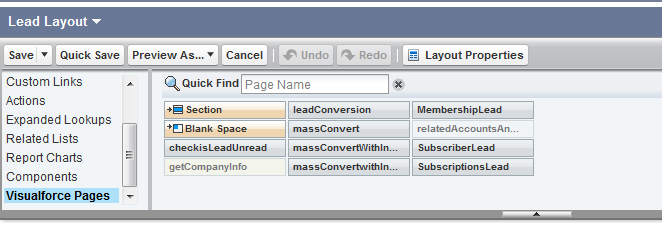
Goto Setup ->Customize -> Leads ->PageLayout
Click Edit on the layout you want the Leadpal intellegence and Related Accounts and Contacts to be displayed. Click on visualforce pages and pull down the VF pages getCompanyInfo and relatedAccountsAndContacts page into the layout and place them after the description field.
To change the Fields that need to be displayed in Related Accounts and Related Contact related lists.
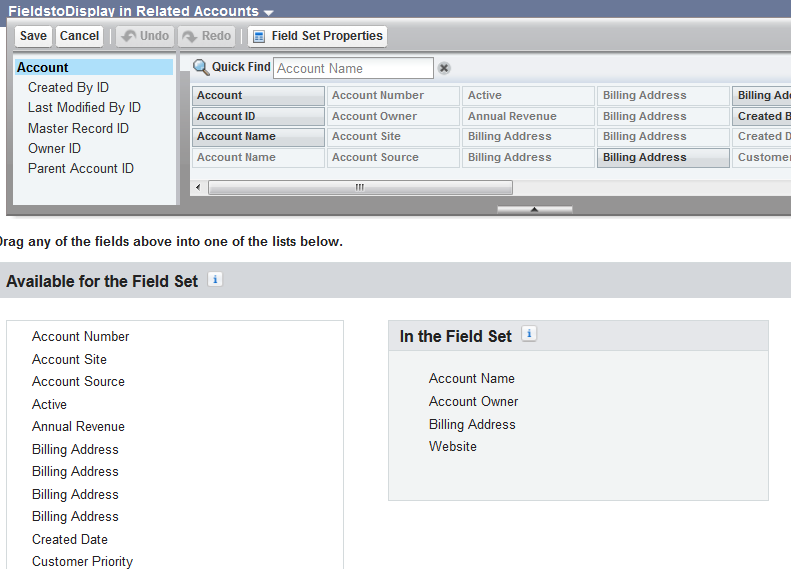
Go to Setup -> Customize -> Accounts -> fieldsets
Click on edit against the fieldset CMFL__FieldstoDisplay_in_Related_Accounts and “Drag and Drop” fields that you want to display in the related list to the box in the right titled “In the field Set”
Follow the same process for Contacts as well
Go to Setup -> Customize -> Contact-> fieldsets
Click on edit against the CMFL__FieldstoDisplay_in_Related_Contact and “Drag and Drop” fields that you want to display in the related list to the box in the right titled “In the field Set”





Recent Posts
- Account Based Marketing – How Is It Different, and What Are The Best Tactics?
- Add new licenses or cancel subscription for Leadpal appexchange product
- Salesforce to Quickbooks integration options
- Online Salesforce Apex and Visualforce Development Trainings
- Merge and Auto Convert of leads into existing Accounts based on Rules : LeadPal
Archives
- September 2015
- July 2015
- May 2015
- April 2015
- March 2015
- February 2015
- November 2014
- October 2014
- July 2014
- June 2014
- April 2014
- March 2014
- January 2014
- December 2013
- November 2013
- October 2013
- September 2013
- August 2013
- July 2013
- December 2012


