
If you are a Leadpal subscriber and want to add more licenses here is a step by step guide.
Step 1: Goto www.appexchange.salesforce.com, click on login using your salesforce login credentials
Step 2 : Click on My Account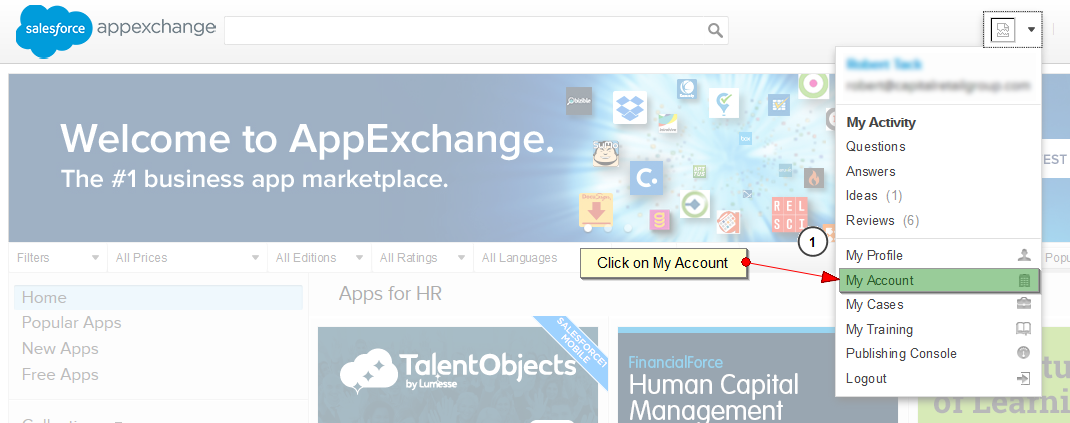
Step 3: You can see all the installed apps in your organization. Click on the modify subscriptions links below Leadpal app.
Step 4: Change the no of users, to add or remove the no of users. If you want to cancel your subscription you can click on the cancel subscription link.

Step 5: Click on Save button.
Post Tagged with Add licenses, appexchange





Recent Posts
- Account Based Marketing – How Is It Different, and What Are The Best Tactics?
- Add new licenses or cancel subscription for Leadpal appexchange product
- Salesforce to Quickbooks integration options
- Online Salesforce Apex and Visualforce Development Trainings
- Merge and Auto Convert of leads into existing Accounts based on Rules : LeadPal
Archives
- September 2015
- July 2015
- May 2015
- April 2015
- March 2015
- February 2015
- November 2014
- October 2014
- July 2014
- June 2014
- April 2014
- March 2014
- January 2014
- December 2013
- November 2013
- October 2013
- September 2013
- August 2013
- July 2013
- December 2012
Categories
Tags
ABM
Add licenses
apex and visualforce
apex training
appexchange
auto covert leads
batch convert leads
Channel conflict
Communities-360 Mobile
CRM
CRM Training
Deal registration
Lead communication
lead convert
Lead intelligence
Leadpal
Linkedin
linkedin connectivity
Mass assign Accounts
multi lead conversion
MultiLead Convert
Partner Portal customization
partner relationship management
PRM
PRM Mobile
salesforce
Salesforce career
salesforce certification
Salesforce communities customization
spam control
visualforce training


